We provide Mails Configuration on Email Client Outlook of webmail.
CONTACT US NOW





Provide email support & services of webmail outlook
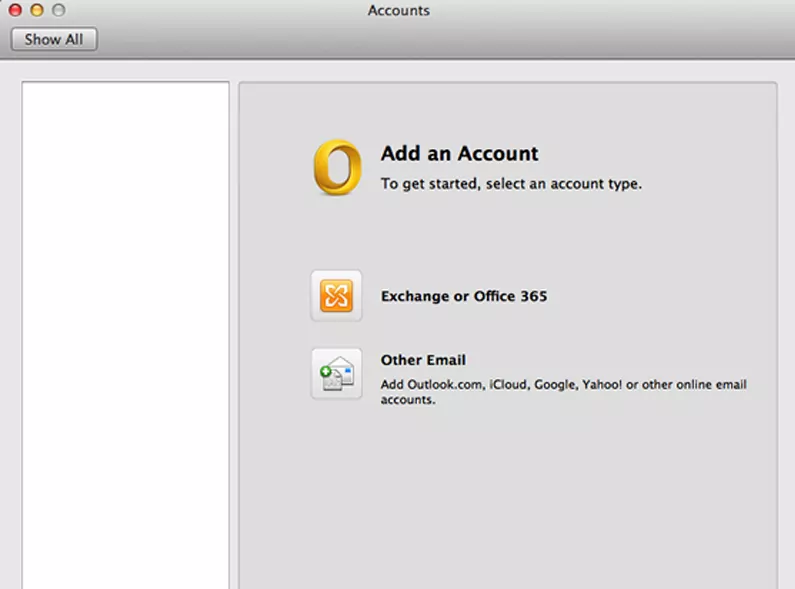
You can add different email accounts to Microsoft 365, iCloud, Gmail, Exchange, Yahoo and other accounts.
Email accounts such as Google, Microsoft 365, Outlook, Exchange, Live, and Hotmail are set up quickly.
Get professional help for Microsoft Outlook settings and issues.
Microsoft Outlook is an application you pay for and install on your computer or any device. An Outlook email is a free email address from Microsoft.
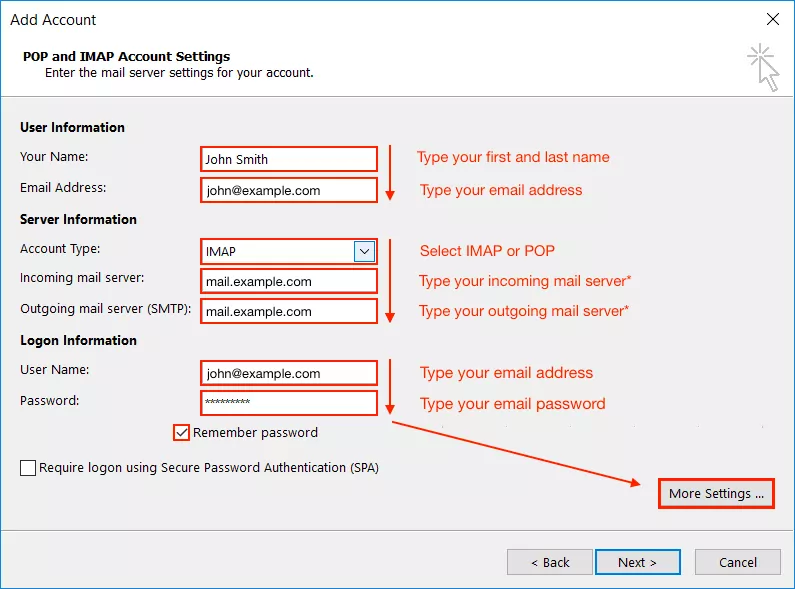
The first time you open Outlook, an Auto Account Wizard opens. If not, choose File then Add Account. On the E-mail Accounts page, choose Add Account. On the Auto Account Setup page, enter your name, email address, and password, and then choose Finish.
The main difference between Outlook and the Mail app is the target audience. The bundled app with Windows is meant to cater to consumers and those who check their emails on a daily basis.
Outlook is free for personal use. If you want to unlock additional features or get more storage space, you need to purchase a premium plan. The most affordable Outlook premium plan for home users is called Microsoft 365.
IMAP is one of the most common protocols for receiving email. IMAP syncs messages across all devices. POP3 is another protocol for receiving email on a single device. Using POP3 means that your email will be accessible offline and deleted from the server.